
使用 atrace 为 Android 应用/平台添加 trace
在本指南中,你将学习如何:
- 为你的 Android 应用或平台代码添加
ATrace插桩。 - 在 Perfetto UI 中记录和可视化
ATrace事件。 - 理解
ATrace和 Perfetto Tracing SDK 之间的区别。
本页面主要面向:
- 为其平台服务添加插桩的 Android 平台工程师。
- 为其 native HAL 和 Java/Kt 服务添加插桩的系统集成商 / Android 合作伙伴。
- 为其应用添加插桩的 Native 和 Java/Kt 应用开发者(尽管你应该考虑使用 androidx.tracing,详见下文)
Atrace 是 Android 4.3 中引入的 API,在 Perfetto 之前就存在,允许你为代码添加插桩。它仍然被支持和使用,并且与 Perfetto 配合良好。
在底层,Atrace 将事件转发到内核 ftrace 环形缓冲区,并与调度数据和其他系统级 trace 数据一起被获取。Atrace 既是:
- 一个公共 API,通过 Android SDK 暴露给 Java/Kt 代码,通过 NDK 暴露给 C/C++ 代码,开发者可以使用它来丰富 trace 以注释其应用。
- 一个私有平台 API,用于注释多个框架函数和核心系统服务的实现。它为开发者提供有关框架在底层正在做什么的见解。
两者之间的主要区别在于,私有平台 API 允许指定一个 tag(也称为 category),而 SDK/NDK 接口隐式使用 TRACE_TAG_APP。
在这两种情况下,Atrace 都允许你手动添加围绕代码墙时间和数值的插桩,例如用于注释函数的开始或结束、逻辑用户旅程、状态更改。
线程作用域同步 slices
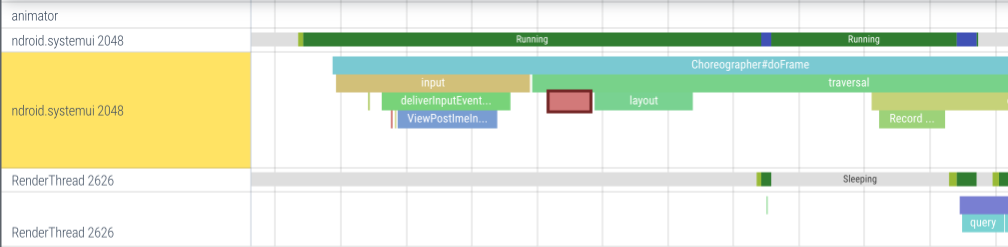
Slices 用于在代码执行周围创建矩形,并在视觉上形成伪调用栈。
语义和约束:
- API: Slices 通过 begin/end API 发出。
- 平衡: Begin/end 必须平衡,并且必须发生在同一线程上。
- 可视化: Slices 在线程作用域 track 中可视化(如上图所示)。
- 跨线程: 对于跨线程用例,请参见下面的跨线程 async slices。
参考 frameworks/base/core/java/android/os/Trace.java
import android.os.Trace;
import static android.os.Trace.TRACE_TAG_AUDIO;

public void playSound(String path) {
  Trace.traceBegin(TRACE_TAG_AUDIO, "PlaySound");
  try {
 // 测量打开声音服务所需的时间。
    Trace.traceBegin(TRACE_TAG_AUDIO, "OpenAudioDevice");
    try {
      SoundDevice dev = openAudioDevice();
    } finally {
      Trace.traceEnd();
    }

    for(...) {
      Trace.traceBegin(TRACE_TAG_AUDIO, "SendBuffer");
      try {
        sendAudioBuffer(dev, ...)
      } finally {
        Trace.traceEnd();
      }
 // 在 trace 中记录缓冲区使用统计信息。
      Trace.setCounter(TRACE_TAG_AUDIO, "SndBufferUsage", dev.buffer)
      ...
    }
  } finally {
    Trace.traceEnd();  // End of the root PlaySound slice
  }
}
// ATRACE_TAG 是在此翻译单元中使用的 category。
// 从 Android 的 system/core/libcutils/include/cutils/trace.h 中
// 定义的 categories 中选择一个。
void PlaySound(const char* path) {
ATRACE_BEGIN("PlaySound");
// 测量打开声音服务所需的时间。
ATRACE_BEGIN("OpenAudioDevice");
struct snd_dev* dev = OpenAudioDevice();
ATRACE_END();
for(...) {
ATRACE_BEGIN("SendBuffer");
SendAudioBuffer(dev, ...)
ATRACE_END();
// 在 trace 中记录缓冲区使用统计信息。
ATRACE_INT("SndBufferUsage", dev->buffer);
...
}
ATRACE_END(); // End of the root PlaySound slice
}参考 SDK reference documentation for os.trace。
// 使用 SDK API 时不能选择 tag/category。
// 隐式所有调用都使用 ATRACE_TAG_APP tag。
import android.os.Trace;

public void playSound(String path) {
  try {
    Trace.beginSection("PlaySound");

 // 测量打开声音服务所需的时间。
    Trace.beginSection("OpenAudioDevice");
    try {
      SoundDevice dev = openAudioDevice();
    } finally {
      Trace.endSection();
    }

    for(...) {
      Trace.beginSection("SendBuffer");
      try {
        sendAudioBuffer(dev, ...)
      } finally {
        Trace.endSection();
      }

 // 在 trace 中记录缓冲区使用统计信息。
      Trace.setCounter("SndBufferUsage", dev.buffer)
      ...
    }
  } finally {
    Trace.endSection();  // End of the root PlaySound slice
  }
}
参考 NDK reference documentation for Tracing。
// 使用 NDK API 时不能选择 tag/category。
// 隐式所有调用都使用 ATRACE_TAG_APP tag。
void PlaySound(const char* path) {
ATrace_beginSection("PlaySound");
// 测量打开声音服务所需的时间。
ATrace_beginSection("OpenAudioDevice");
struct snd_dev* dev = OpenAudioDevice();
ATrace_endSection();
for(...) {
ATrace_beginSection("SendBuffer");
SendAudioBuffer(dev, ...)
ATrace_endSection();
// 在 trace 中记录缓冲区使用统计信息。
ATrace_setCounter("SndBufferUsage", dev->buffer)
...
}
ATrace_endSection(); // End of the root PlaySound slice
}计数器
语义和约束:
- 线程: Counters 可以从任何线程发出。
- 可视化: Counters 在以 counter 名称(字符串参数)命名的进程作用域 track 中可视化。每个新的 counter 名称都会在 UI 中自动产生一个新的 track。进程内不同线程的 counter 事件被折叠到同一个进程作用域 track 中。
参考 frameworks/base/core/java/android/os/Trace.java
import android.os.Trace;
import static android.os.Trace.TRACE_TAG_AUDIO;

public void playSound(String path) {
  SoundDevice dev = openAudioDevice();
  for(...) {
    sendAudioBuffer(dev, ...)
    ...
 // 在 trace 中记录缓冲区使用统计信息。
    Trace.setCounter(TRACE_TAG_AUDIO, "SndBufferUsage", dev.buffer.used_bytes)
  }
}
// ATRACE_TAG 是在此翻译单元中使用的 category。
// 从 Android 的 system/core/libcutils/include/cutils/trace.h 中
// 定义的 categories 中选择一个。
void PlaySound(const char* path) {
struct snd_dev* dev = OpenAudioDevice();
for(...) {
SendAudioBuffer(dev, ...)
// 在 trace 中记录缓冲区使用统计信息。
ATRACE_INT("SndBufferUsage", dev->buffer.used_bytes);
}
}参考 SDK reference documentation for os.trace。
// 使用 SDK API 时不能选择 tag/category。
// 隐式所有调用都使用 ATRACE_TAG_APP tag。
import android.os.Trace;

public void playSound(String path) {
  SoundDevice dev = openAudioDevice();

  for(...) {
    sendAudioBuffer(dev, ...)

 // 在 trace 中记录缓冲区使用统计信息。
    Trace.setCounter("SndBufferUsage", dev.buffer.used_bytes)
  }
}
参考 NDK reference documentation for Tracing。
// 使用 NDK API 时不能选择 tag/category。
// 隐式所有调用都使用 ATRACE_TAG_APP tag。
void PlaySound(const char* path) {
struct snd_dev* dev = OpenAudioDevice();
for(...) {
SendAudioBuffer(dev, ...)
// 在 trace 中记录缓冲区使用统计信息。
ATrace_setCounter("SndBufferUsage", dev->buffer.used_bytes)
}
}跨线程 async slices
Async slices 允许 trace 可能在不同线程上开始和结束的逻辑操作。它们是 Perfetto SDK 中 track events 的相同概念。
由于 begin/end 可以发生在不同的线程上,你需要向每个 begin/end 函数传递一个 cookie 。cookie 只是一个用于匹配 begin/end 对的整数。cookie 通常从代表正在被 trace 的逻辑操作的指针或唯一 ID 派生(例如,作业 id)。
语义和约束:
- 重叠: 由于它们的异步性质,slices 可以在时间上重叠:一个操作可能在前一个操作结束之前开始。
- Cookies: Cookies 在进程内必须是唯一的。你不能在为同一个 cookie 发出 end 事件之前为它发出一个 begin 事件。换句话说,cookies 是进程内的共享整数命名空间。使用单调 Counter 可能是个坏主意,除非你完全控制进程中的所有代码。
- 嵌套和 Tracks: 与线程作用域 slices 不同,嵌套/堆叠只有在使用私有平台 API 时才可能。
...ForTrack函数允许你指定 track 名称,并且所有具有相同 track 名称的事件将在 UI 中被分组到同一个进程作用域 track 中。在 track 内部,嵌套由cookie参数控制。SDK/NDK API 不支持嵌套,并且 track 从事件名称派生。 - 堆叠: 在视觉上,UI 使用贪婪堆叠算法在每个 track 内放置 slice。每个 slice 被放置在不与任何其他 slice 重叠的最上层通道中。这有时会在用户之间产生混淆,因为它创建了"父/子"关系的虚假感觉。然而,与 sync slices 不同,关系纯粹是时间性的而不是因果性的,你无法控制它(除非你有权访问私有平台 API,可以将事件分组到 tracks 中)。
参考 frameworks/base/core/java/android/os/Trace.java
import android.os.Trace;
import static android.os.Trace.TRACE_TAG_NETWORK;

public class AudioRecordActivity extends Activity {
  private AtomicInteger lastJobId = new AtomicInteger(0);
  private static final String TRACK_NAME = "User Journeys";

    ...
    button.setOnClickListener(v -> {
        int jobId = lastJobId.incrementAndGet();
        Trace.asyncTraceForTrackBegin(TRACE_TAG_NETWORK, TRACK_NAME, "Load profile", jobId);

 // 模拟异步工作(例如,网络请求)
        new Thread(() -> {
            Thread.sleep(800); // emulate latency
            Trace.asyncTraceForTrackEnd(TRACE_TAG_NETWORK, TRACK_NAME, jobId);
        }).start();
    });
    ...
}
// ATRACE_TAG 是在此翻译单元中使用的 category。
// 从 Android 的 system/core/libcutils/include/cutils/trace.h 中
// 定义的 categories 中选择一个。
static constexpr const char* kTrackName = "User Journeys";
void onButtonClicked() {
static std::atomic<int> lastJobId{0};
int jobId = ++lastJobId;
ATRACE_ASYNC_FOR_TRACK_BEGIN(kTrackName, "Load profile", jobId);
std::thread([jobId]() {
std::this_thread::sleep_for(std::chrono::milliseconds(800));
ATRACE_ASYNC_FOR_TRACK_END(kTrackName, jobId);
}).detach();
}参考 SDK reference documentation for os.trace。
// 使用 SDK API 时不能选择 tag/category。
// 隐式所有调用都使用 ATRACE_TAG_APP tag。
import android.os.Trace;

public class AudioRecordActivity extends Activity {
  private AtomicInteger lastJobId = new AtomicInteger(0);

    ...
    button.setOnClickListener(v -> {
        int jobId = lastJobId.incrementAndGet();
        Trace.beginAsyncSection("Load profile", jobId);

      // 模拟异步工作(例如,网络请求)
        new Thread(() -> {
            Thread.sleep(800); // emulate latency
             Trace.endAsyncSection("Load profile", jobId);
        }).start();
    });
    ...
}
参考 NDK reference documentation for Tracing。
// 使用 NDK API 时不能选择 tag/category。
// 隐式所有调用都使用 ATRACE_TAG_APP tag。
void onButtonClicked() {
static std::atomic<int> lastJobId{0};
int jobId = ++lastJobId;
ATrace_beginAsyncSection("Load profile", jobId);
std::thread([jobId]() {
std::this_thread::sleep_for(std::chrono::milliseconds(800));
ATrace_endAsyncSection("Load profile", jobId);
}).detach();
}我应该使用 Atrace 还是 Perfetto Tracing SDK?
在撰写本文时,这个问题没有一个明确的答案。我们的团队正在努力提供一个可以包含所有 atrace 用例的替代 SDK,但我们还没有达到目标。所以答案是:视具体情况而定。
| 何时优先选择 Atrace | 何时优先选择 Tracing SDK |
|---|---|
| 你需要简单且有效的功能。 | 你需要更高级的功能(例如 flows)。 |
| 你可以接受整个应用的一个开/关切换。(如果你在 Android 系统中,你只能使用有限的 tags) | 你需要对 trace categories 进行细粒度控制。 |
| 你可以接受事件在主 ftace 缓冲区中被多路复用。 | 你希望控制在不同缓冲区中多路复用事件。 |
| 插桩开销不是大问题,你的 trace 点偶尔被命中。 | 你希望为你的插桩点实现最小开销。你的 trace 点是频繁的(每 10ms 或更少) |
如果你是一个独立应用
你应该考虑使用 Jetpack 的 androidx.tracing。我们与 Jetpack 项目密切合作。使用 androidx.tracing 将在我们改进 SDK 时带来更平滑的迁移路径。
采集 trace
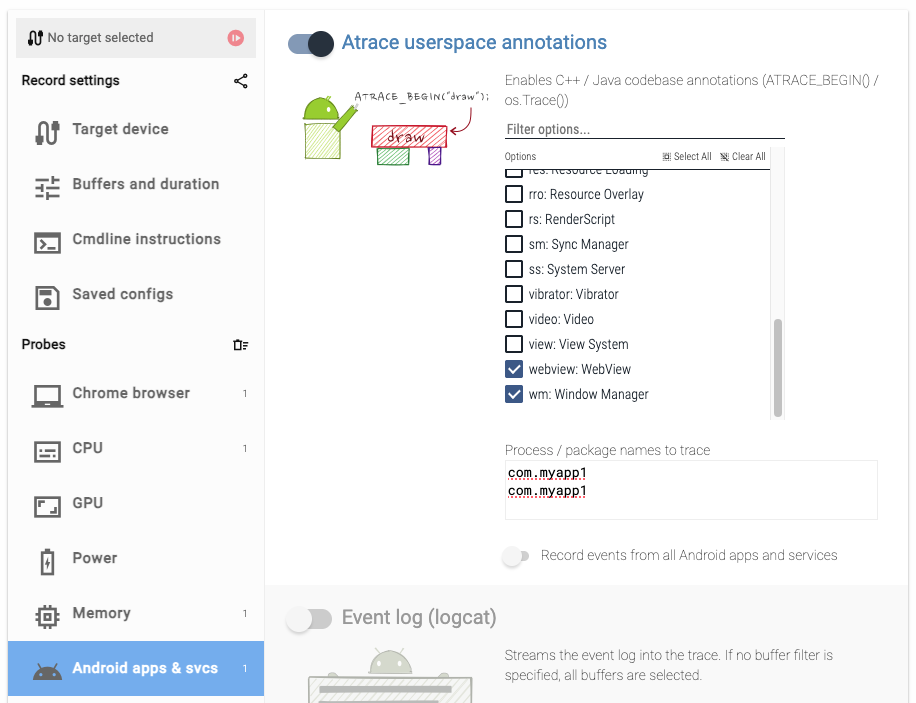
为了记录 atrace,你必须启用 linux.ftrace 数据源并在 ftrace_config 中添加:
- 对于平台私有系统服务:
atrace_categories: tag_name - 对于应用:
atrace_apps: "com.myapp"或atrace_apps: "*"以适用于所有应用。
你可以在这里看到完整的 atrace categories 列表here。
curl -O https://raw.githubusercontent.com/google/perfetto/main/tools/record_android_trace

python3 record_android_trace \
  -o trace_file.perfetto-trace \
  -t 10s \
 # To record atrace from apps.
  -a 'com.myapp'  \  # or '*' for tracing all apps
 # To record atrace from system services.
  am wm webview
data_sources {
config {
name: "linux.ftrace"
ftrace_config {
atrace_categories: "am"
atrace_categories: "wm"
atrace_categories: "webview"
atrace_apps: "com.myapp1"
atrace_apps: "com.myapp2"
}
}
}后续步骤
现在你已经学习了如何使用 ATrace 插桩你的代码,这里是一些你可能觉得有用的其他文档:
采集 trace
- Recording system traces : 了解有关在 Android 上采集 trace 的更多信息。
其他 Android 数据源
- Scheduling data : 查看哪些线程在哪些 CPU 上运行。
- CPU frequency : 查看每个 CPU 运行多快。
分析 trace
- Perfetto UI : 了解 trace viewer 的所有功能。