
从 Perfetto 转换为其他 trace 格式
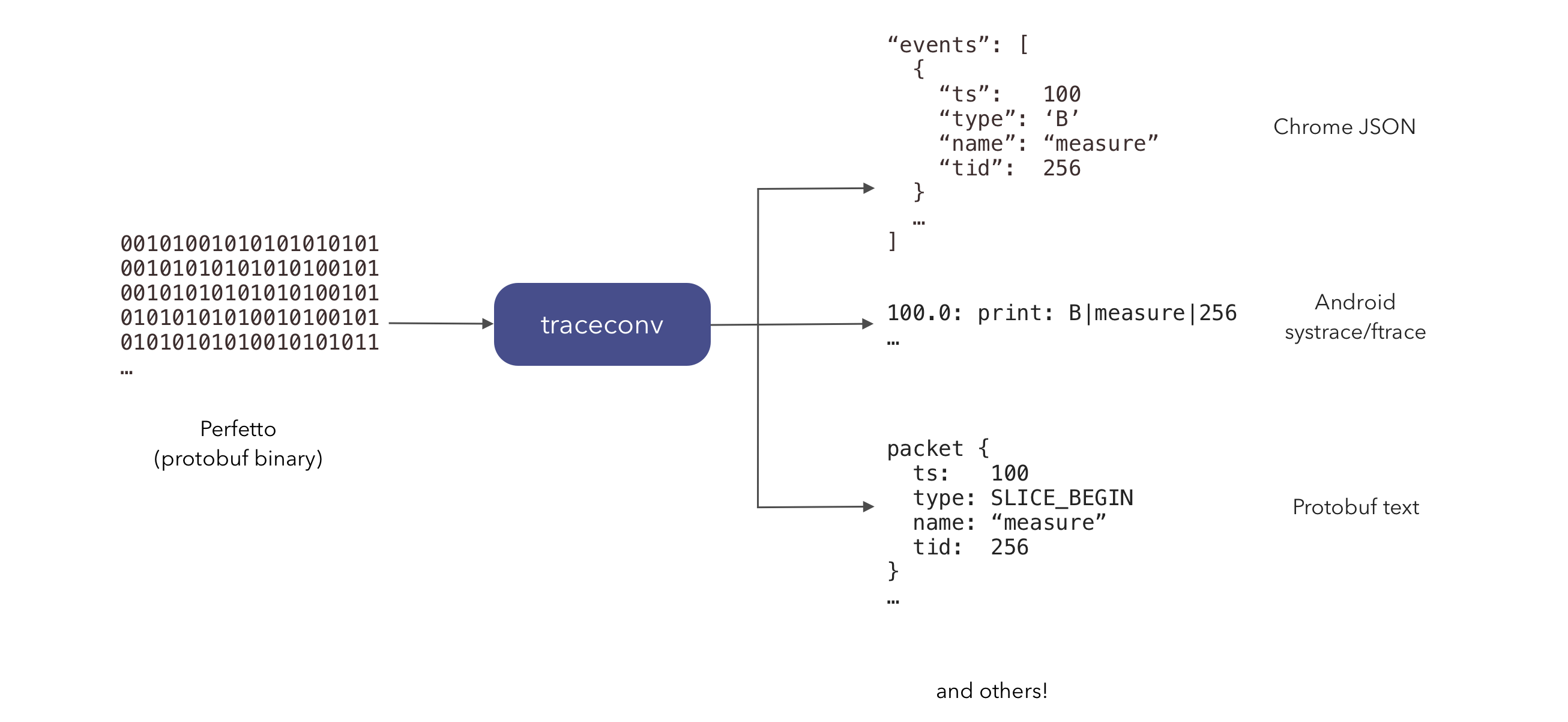
Perfetto 的原生 protobuf trace 格式可以使用 trace_processor 的 convert 子命令转换为其他格式。
NOTE: 此功能过去位于一个独立的
traceconv工具中。该工具已并入trace_processor。traceconv下载仍可作为向后兼容的别名使用(它现在会获取trace_processor并以此模式运行),但新的脚本和文档应使用trace_processor。
要将原生符号或 ProGuard/R8 反混淆映射附加到 trace,请改为参阅符号化与反混淆(
bundle和util子命令)。本页面仅涵盖格式转换。要将 trace processor 解析出的表(而非 trace 本身)导出为 SQLite、Arrow 或可重新加载的 Perfetto 归档,请改用
export子命令:参见导出 trace 数据。
前提条件
- 运行 Linux、macOS 或 Windows 的主机
- Python 3(仅在使用下面的
trace_processor包装脚本时需要;在 Windows 上还需要curl,Windows 10 及更高版本自带) - Perfetto protobuf trace 文件
使用方法
使用最新的二进制文件:
curl -LO https://get.perfetto.dev/trace_processor
chmod +x trace_processor
./trace_processor convert <format> [OPTIONS] [input_file] [output_file]
curl.exe -LO https://get.perfetto.dev/trace_processor
python trace_processor convert <format> [OPTIONS] [input_file] [output_file]trace_processor 脚本是一个轻量级 Python 包装器,首次使用时会在 ~/.local/share/perfetto/prebuilts 下下载并缓存适合你平台的原生二进制文件。
当省略输入或输出路径(或传递 -)时,convert 从 stdin 读取并写入 stdout。运行 ./trace_processor help convert 可打印你的版本支持的所有格式和选项的完整列表。
格式转换
| 格式 | 输出 |
|---|---|
text |
protobuf 文本格式 — proto 的文本表示 |
json |
Chrome JSON 格式,可在 chrome://tracing 中查看 |
systrace |
Android systrace 使用的 ftrace 文本/HTML 格式 |
ctrace |
压缩的 systrace 格式 |
profile |
聚合的 pprof profile(heapprofd、perf、Java heap 图) |
firefox |
Firefox profiler 格式 |
示例:
./trace_processor convert json     trace.perfetto-trace trace.json
./trace_processor convert systrace trace.perfetto-trace trace.html
./trace_processor convert text     trace.perfetto-trace trace.textproto
profile 将一个或多个 .pb 文件写入目录(默认为随机临时目录)而不是单个输出文件,因此请使用 --output-dir 而不是位置输出路径:
./trace_processor convert profile --output-dir ./profiles trace.perfetto-trace
./trace_processor convert profile --java-heap --pid 1234 --output-dir ./profiles trace.perfetto-trace
./trace_processor convert profile --perf --timestamps 1000000,2000000 --output-dir ./profiles trace.perfetto-trace
常用选项:
--truncate start|end(用于systrace、json、ctrace):仅保留 trace 的开头或结尾。--full-sort(用于systrace、json、ctrace):强制对 trace 进行完整排序。--skip-unknown(用于text):跳过未知的 proto 字段。--alloc | --perf | --java-heap(用于profile):限制为单个 profile 类型(默认:自动检测)。--no-annotations(用于profile):不向 Frame 添加派生注释。--pid/--timestamps(用于profile):按进程或特定样本时间戳过滤。--output-dir DIR(用于profile):生成的 pprof 文件的输出目录。
关于 convert text 的逆操作(将文本格式的 trace 转换回二进制)以及其他底层 trace 辅助工具,参见 trace_processor help util。
在旧版 systrace UI 中打开
如果你只想使用旧版(Catapult)trace 查看器打开 Perfetto trace,可以直接导航到 ui.perfetto.dev,并使用 "Open with legacy UI" 链接。这会在浏览器中使用 WebAssembly 运行 trace 转换,并将转换后的 trace 无缝传递给 chrome://tracing。